Posts

Showing posts with the label my process

Vegetable Countdown

Image
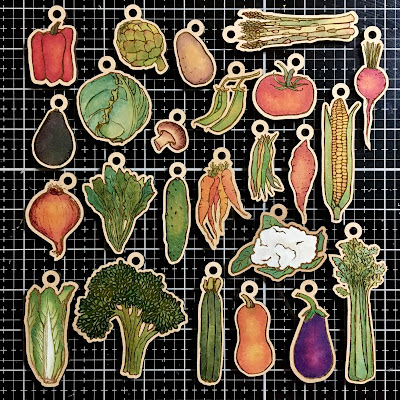
I got a Glowforge for my birthday. It's got so much potential I don't even know what to do first.  So, rather than debate about it, I decided to make the first thing that came into my head, which oddly enough was a vegetable advent calendar for my mom. Here are the veggies. Up they go! Here's the backboard, with and without vegetables. This book binding is called Secret Belgian Binding (without the pages). You can see step-by-step binding instructions  here , but I learned it from Nathalie Kalbach's Time Travelers mixed media online class.  First, I drew the vegetables and the gardening tools that you see on the backboard, drawing some on paper and some on my iPad (using Procreate). Next, I uploaded them to the computer, and used Adobe Illustrator to create the cut line around the edge. Then, I put the Glowforge to work. First I told it to engrave the drawings. Then I told it to cut them out. After quite a bit of trial and error involving no fewer than four little w...

My Tree Overfloweth

Image
My Tree Overfloweth - Florence Turnour 2020 This project started with a palette of collage paper.  I chose a palette of colors, then I painted thin lightly waxed Sandwich Paper (deli paper) using these colors, using a gel plate and some of the stencils I designed. I created a large tree stencil, painted a black rectangle on watercolor paper, and sponged the tree onto the background. Then I started designing animals. I drew the animals in pencil, and used the photocopier to resize them until they fit nicely on the tree. I cut the drawings out, and traced the shapes onto my collage paper. For the small details like eyes and ears, I assembled the shapes before cutting them out. Here they are. I worked on this one type of animal at a time over months, between working on other things, and not having time to do any artwork. I posted the individual animals on Instagram as I went. I made a few animals that didn't go on the final tree. These rhinoceroses were too busy, and ended up in a s...

Screen printing

Image
I love making stencils, but stencil designs are limited in that they have to be one piece. For example you cannot have a stencil top print this shape because the inside white bits in the leaves would fall out. The white part, which is the stencil, is not one piece.  Stamps do not have this issue, but if you are cutting them out of foam, and gluing them down to make a stamp, lining up all the insides of the leaves, for example, would be tricky. Another option is to use a screen. Here is my first one. You can see the screen, taped to a cardboard frame in the top of the image, and some patterned paper I made with it at the bottom. I had the best results screen printing onto a Gelli plate, and printed from there onto paper. The screen suctioned itself onto the Gelli Plate, so there was very little leakage, and I could use the brayer to spread the paint, as there was no longer a need to push hard. I loved how it worked, so I made some more. These I mounted in mat boards, whi...

Reduction Printing

Image
I watched this video by Canadian printmaker,  Linda Cote , and thought I'd try my hand at reduction printing. I thought I'd be able to make myself keep it simple by doing a small one for my first attempt, but I still drew quite a complicated image. The final print is only 3x3 inches. I printed the last two layers on their own as well. Watch Linda Cote's video to see what reduction printing is. For my image, I first sketched it in my sketchpad. And then I scanned it into the computer and traced it in Photoshop (and reversed it because, uh, I don't know why). Then I printed the image and transferred it to an easy carve rubber block for carving. I learned a lot doing this. I am looking forward to doing another one. Thanks for looking!

Keeping cards clean while Gelli printing

Image
I printed on my Gelli Plate some greeting cards the other day, and it took me quite a few tries to figure out how to get coverage all the way to the edge without getting the back and inside of the card dirty. Here's how I did it. Step 1. Ink the plate. In this picture, I only inked about three quarters of the 8"x10" plate because I was making 5"x7" cards. I placed a stencil (black) onto the paint (pink). Step 2.  Cover the part of the plate that you don't want to print. For me this included the part without paint on it. I used a sheet of deli paper. Step 3.  Fold the card, and place the card on the deli paper, back side down, so only a small part of the back of the card sticks over onto the paint. This will allow the print to wrap around to the back of the card slightly.  In the picture, I zoomed in on the top corner of the card, so you can see the slight overlap onto the paint. The front of the card is face up in the photo. Step 4.  Unfold the c...

There's printing and then there's printing

Image
We have a 3D Printer. It's a Makerbot 2, if that means anything to anyone. Here's a vine I took of my cutter and the 3D Printer side by side working away. On Sunday, I drew some fish with a pen on paper. I scanned them into Photoshop, and edited them a bit. Here's one. I changed it into a vector graphic in Illustrator. Then it looked like this. Next I exported it into a 3D drawing program called Sketchup, which I got for free on the internet. I thickened the fish into a 3D model. I exported it to the appropriate format for 3-D printing and sent it to the printer.  It took about 2 hours to print, and cost me $0.87 in plastic. Voila! It's for block printing. I attached a knob to the back with velcro so that it would be easier to pick up without getting paint on my fingers.  Then I used a brayer to roll on block printing ink for fabric and printed my fish on a piece of cotton. How much fun is that? I'm rather excited. I'm going to make a cat and...

Gelli Print of the day

Image
I'm taking Julie Balzer's Junque Journal on-line class , and in it I'm taking much of my artwork that's been lying around the house and binding it into a book. The book will have lots of room to add more art, and be my working art journal for some time.  I have assembled 10 out of the 20 pages that I need so far.  Going through all my prints and papers made me really want to get on that Gelli Plate, so yesterday, I took a break from page making and did some printing. I cut three new stencils for this session. I drew the cat above in marker and then scanned him into Illustrator to make the stencil. I made a small one to use on ATC's, and a large one, because I wanted room to doodle on him. Both the stencil and the mask came out well. In the image with the small cats above, I used both.  My other new stencil was a real pain to get off the cut matt, when it came out of the cuter. The spirals uncurled like little snakes and kept getting tangled and stuck to the...